
PlantPal
iPhone · iPad · Mac · Android
Take a photo, know the plant, care for it right.
PlantPal identifies plants from a photo, writes down the right care, reminds you to water and checks from a photo whether your plant is doing well.
Identify plants from a photo, get care tips and watering reminders, check their health · iPhone, iPad and Mac · Android in testing
iPhone7


iPad6


Mac5


Android6


Identify and keep
Take a photo of a leaf or flower and PlantPal lists the most likely species with a match probability. Tap the right one and the plant goes into your collection with its photo – care tips included.
- AI identification (Claude by Anthropic)
- Up to five matches, the best one highlighted
- Your collection with photo, watering status and your own notes, sorted the way you like
Care and watering plan
Every plant comes with watering interval, light, temperature, fertilizing and toxicity for cats, dogs and people. One tap on “Watered now” resets the plan, and a notification can remind you of the next watering. PlantPal also reminds you to fertilize and repot at the right time: feeding only during the growing season, repotting in spring. The care tips are written by Claude by Anthropic.
Plant journal
Capture with photos, date and notes how each plant is doing – the new leaf, the fresh pot, the new spot. Photos from “Check plant” land here with their finding, so you can see at a glance how the plant is doing. Any journal photo can also be used for a check or become the cover photo.
Check plant
One photo is enough and PlantPal assesses whether diseases, pests or care mistakes are involved. You get a table with finding, cause and confidence, plus concrete measures and next steps. If the plant is already saved, you don’t have to photograph it again. If there is an earlier check, PlantPal compares automatically and tells you whether it has improved. Every check photo lands in the plant journal with its finding.
Ask about your plant
On every plant page you can ask questions – about care, location, pests or diseases. The answers know your plant and its latest health check.
Plant sensor
With a Bluetooth plant sensor (Xiaomi Flower Care, also known as MiFlora) you see soil moisture, light, fertilizer and temperature right on the plant page, each with its target range and a history of up to 30 days. PlantPal notices when you watered, and syncs the sensor link and readings to your other devices through iCloud. Without a sensor you can try everything with the demo sensor.
- Only Bluetooth sensors of the Flower Care type, no Zigbee sensors
- Without a Bridge, readings stay on your devices and in your iCloud
From anywhere: With PlantPal Plus and the PlantPal Bridge, a small ESP32 plugged into a socket, readings arrive every 5 minutes, even when you’re not at home. You install the firmware right in your browser and set it up in the app.
Your data
- The collection lives on your device and syncs to your other devices through your private iCloud, for example between iPhone, iPad and Mac
- No account, no ads, no tracking
- For identification and the health check, photos go through my server to Anthropic and are not stored by me
- The “About” tab shows what is stored, lets you delete everything and report a problem
Pricing
- Free – €0: every month 5 identifications, 2 care tips, 3 plant checks and 3 questions, no account
- PlantPal Plus monthly – €2.99 per month: up to 100 identifications, 60 care tips, 130 plant checks and 100 questions per month
- PlantPal Plus yearly – €24.99 per year (€2.08 per month, about 30% cheaper): the same benefits
No weekly subscription, no ads, no tracking.
Prices include VAT in Austria; in other countries the App Store shows the matching local price. The subscription renews automatically and can be canceled any time in your Apple account settings. Purchase, payment and cancellation go through Apple.
Requirements
- iPhone or iPad with iOS or iPadOS 17 or later, Mac with macOS 15 or later
- Android 8.0 or later, currently in a closed test on Google Play
- The app is available in English, German, French, Spanish, Portuguese (Brazil), Japanese, Korean and Simplified Chinese and follows your device’s language
- For the plant sensor: Bluetooth and a Flower Care sensor; for the Sensor Bridge also PlantPal Plus, an ESP32 board and 2.4 GHz Wi-Fi
- An internet connection for identification, care tips and the health check
- iCloud if you want to sync the collection
Mac
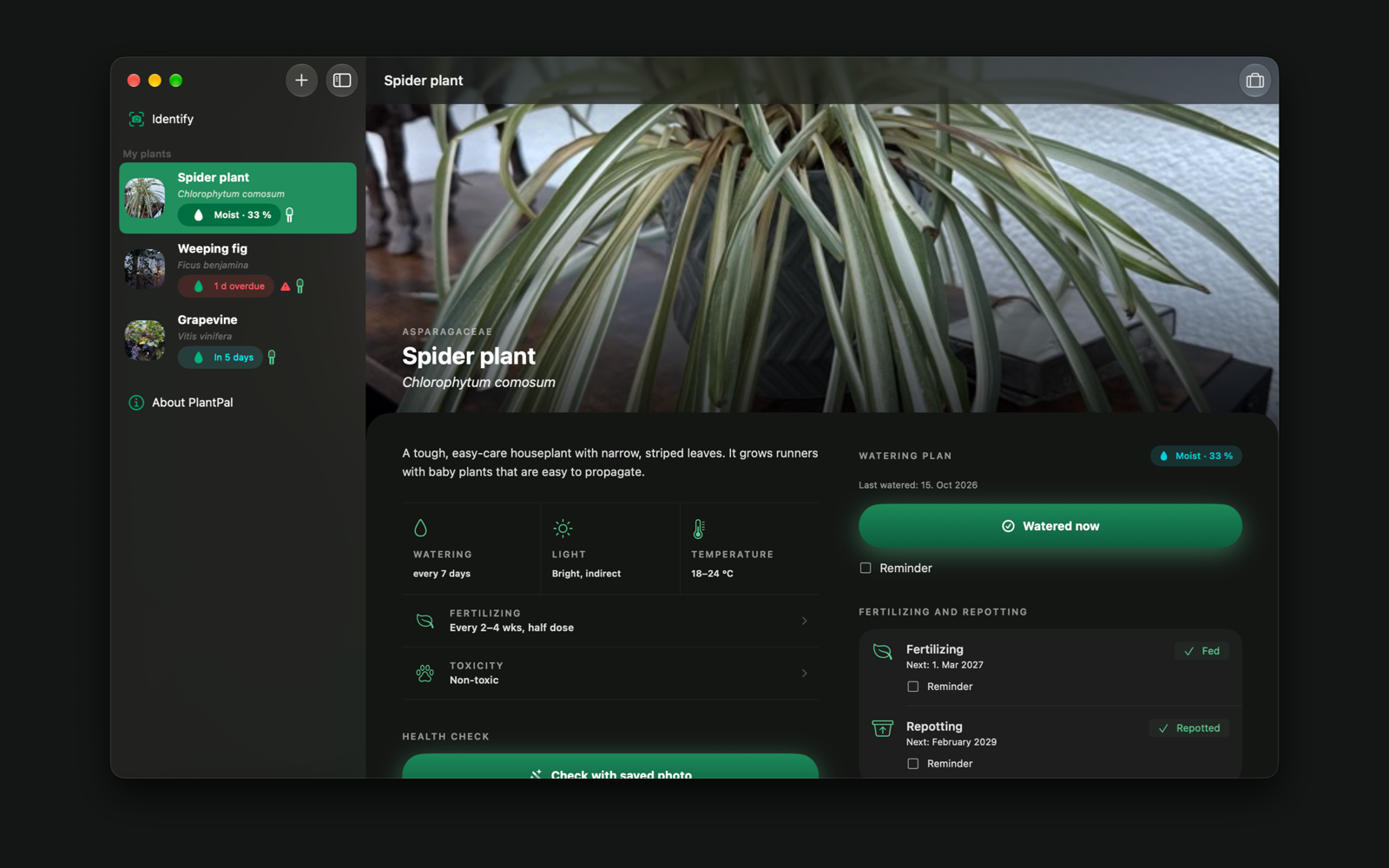
PlantPal is also a native Mac app: all your plants in the sidebar on the left, the plant page on the right. Take photos with your iPhone (Continuity Camera), pick them in the Finder or Photos, or just drag them into the window. The watering plan comes to your desktop as a widget, and the plant sensor works over the Mac’s Bluetooth. One purchase covers iPhone, iPad and Mac, PlantPal Plus too, and the collection syncs through iCloud.
Android
PlantPal is now also available for Android, currently in a closed test on Google Play. Identifying plants from a photo, care tips, a watering plan with reminders, the health check, the plant journal and the plant sensor all work as on iPhone.
Testers wanted
Before publishing, Google requires a test with at least twelve people who keep the app installed for 14 days. Got an Android phone and want to help? Write to support@bumberger.at and you will get the invitation link. Thank you!
Support
Questions, feedback or a bug? Write to me at support@bumberger.at – I usually reply within 1–2 working days. In the app, “About → Report a problem” prepares a matching email.
How accurate are the results?
Identification, care tips and the health check are estimates and no substitute for expert advice. With toxic plants and children or pets at home, ask a vet or a poison control center if in doubt.
What does it cost?
The free version stays free (every month 5 identifications, 2 care tips, 3 plant checks and 3 questions). PlantPal Plus costs €2.99 per month or €24.99 per year and can be canceled any time in your Apple account settings.
Where do my photos go?
For identification and the health check, the photo is sent through my server to Anthropic (Claude) and not stored by me. Everything else stays on your device and in your iCloud. Details are in the privacy policy.